Apple G5-iMac
Power Supply / 20-Inch Replacement Instructions
| Part No. | G5-iMac |
|---|---|
| Datasheet | G5-iMac Download |
| Manufacturer |  Apple Apple |
| Description | Power Supply / 20-Inch Replacement Instructions |
| Buy | Stock & Price |
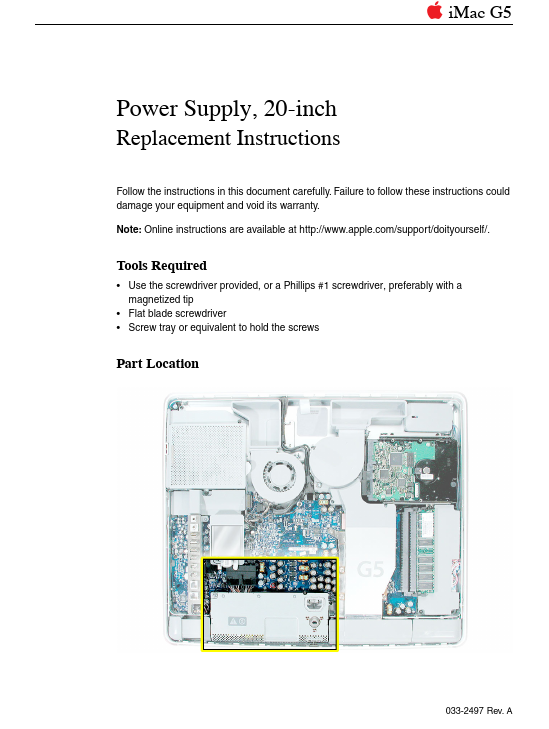
iMac G5 Power Supply, 20-inch Replacement Instructions Follow the instructions in this document carefully. Failure to follow these instructions could damage your equipment and void its warranty. Note: Online instructions are available at Tools Required
● Use the screwdriver provided, or a Phillips #1 screwdriver, preferably with a magnetized tip
● Flat blade screwdriver
● Screw tray or equivalent to hold the screws Part Location 033-2497 Rev. A Important Things to Know 1. A spares kit is included with the replacement part. The kit includes:
● a Phillips #1 screwdriver
● extra screws 2. All customer removable screws are brass colored. Do not remove screws unless they are brass colored, or you will void your warranty. 3. Ground yourself when working on the computer. The procedure will show you how to ground yourself. 4. Do not pull on individual wires when disconnecting a part; pull on the connector. 2 - iMac G5 Power Supply, 20-inch Opening the Computer 1. Turn off your computer by choosing Shut Down from the Apple (K) menu.
● Use the screwdriver provided, or a Phillips #1 screwdriver, preferably with a magnetized tip
● Flat blade screwdriver
● Screw tray or equivalent to hold the screws Part Location 033-2497 Rev. A Important Things to Know 1. A spares kit is included with the replacement part. The kit includes:
● a Phillips #1 screwdriver
● extra screws 2. All customer removable screws are brass colored. Do not remove screws unless they are brass colored, or you will void your warranty. 3. Ground yourself when working on the computer. The procedure will show you how to ground yourself. 4. Do not pull on individual wires when disconnecting a part; pull on the connector. 2 - iMac G5 Power Supply, 20-inch Opening the Computer 1. Turn off your computer by choosing Shut Down from the Apple (K) menu.