AK4552-A
AK4552-A is 24bit A/D and D/A converter manufactured by Asahi Kasei Microdevices.
DESCRIPTION
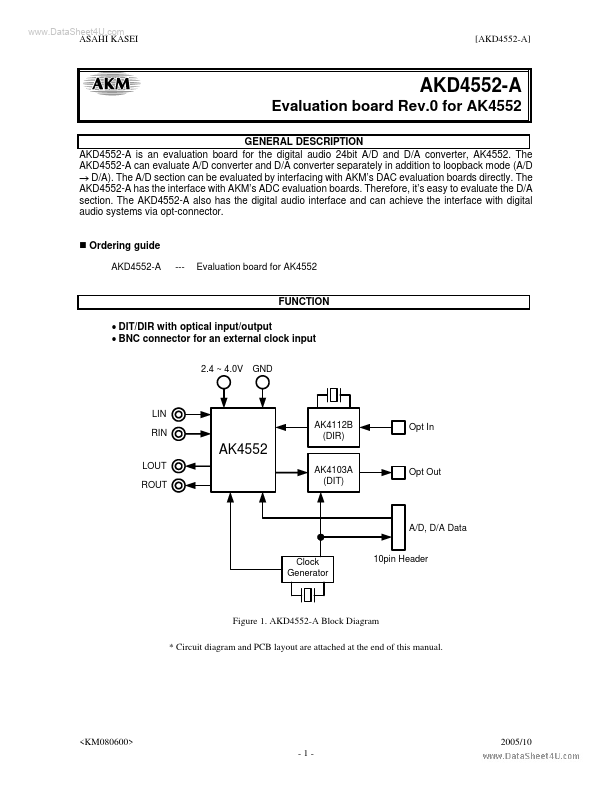
AKD4552-A is an evaluation board for the digital audio 24bit A/D and D/A converter, AK4552. The AKD4552-A can evaluate A/D converter and D/A converter separately in addition to loopback mode (A/D → D/A). The A/D section can be evaluated by interfacing with AKM’s DAC evaluation boards directly. The AKD4552-A has the interface with AKM’s ADC evaluation boards. Therefore, it’s easy to evaluate the D/A section. The AKD4552-A also has the digital audio interface and can achieve the interface with digital audio systems via opt-connector.
- Ordering guide
AKD4552-A --Evaluation board for AK4552
FUNCTION
- DIT/DIR with optical input/output
- BNC connector for an external clock input
2.4 ~ 4.0V GND
LIN RIN AK4112B (DIR) Opt In
AK4552
LOUT ROUT AK4103A (DIT) Opt Out
A/D, D/A Data 10pin Header
Clock Generator
Figure 1. AKD4552-A Block Diagram
- Circuit diagram and PCB layout are attached at the end of this manual.
<KM080600> -1-
2005/10
.. ASAHI KASEI
[AKD4552-A]
- Analog Input Circuit
External analog signal fed through the BNC connector is terminated by a resistor of 560 ohms. The resistor value should be properly selected in order to meet the output impedance of the signal source.
J4(J2) LIN(RIN) C4(C2) 10u LIN(RIN)pin +
R6(R4) 560
Figure 2. Input buffer circuit on board
- AKM assumes no responsibility for the trouble when using the circuit examples.
- Analog Output Circuit
The AK4552 includes a bination of switched-capacitor filter (SCF) and continuous-time filter (CTF), so any external filters are not required.
- Operation sequence
1) Set up the power supply lines. [VA] (orange) = 2.4 ∼ 4.0V : for VA of AK4552 (typ. 3.0V) [D2V] (orange) = 2.4 ∼ 4.0V : for D2V of 74LVC541 (typ. 3.0V) [VCC] (red) = 3.6 ∼ 5.0V : for logic [AGND] (black) = 0V : for analog ground (including VSS of AK4552) [DGND] (black) = 0V : for logic ground Each supply line should be distributed from the power supply unit. D2V and VA must be same voltage level. 2) Set up the...