Celerity TD100
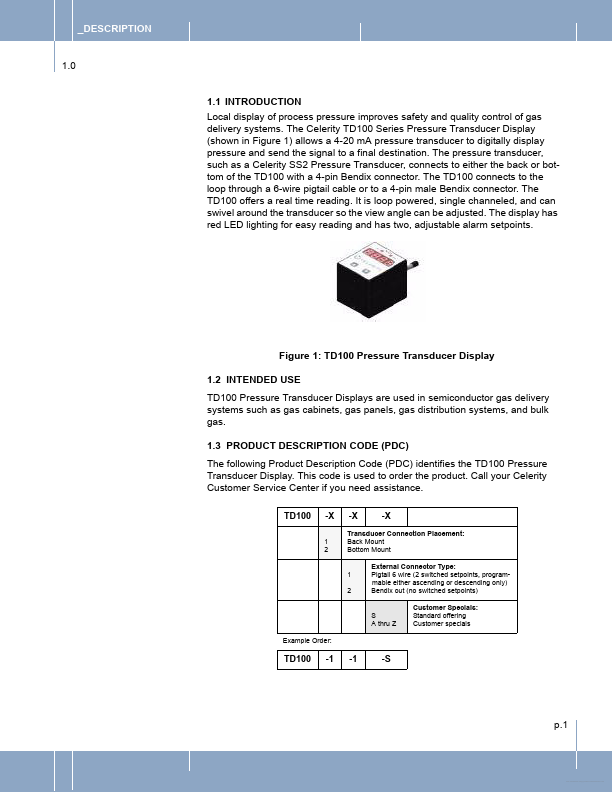
THE TD100 TO OPERATE A RELAY _2.5 POSITIONING THE TD100 _3.0 OPERATION _3.1 TD100 OPERATION _3.2 USER MENU FLOW CHART _3.3 OPERATING THE USER MENU _4.0 APPENDIX TD100 CALIBRATION _5.0 WARRANTY 1 1 1 1 2 2 3 4 4 4 4 6 6 7 7 8 9 10 12 p.i Free Datasheet _ _DESCRIPTION 1.0 1.1 INTRODUCTION Local display of process pressure improves safety and quality control of gas delivery systems. The Celerity TD100 Series Pressure Transducer Display (shown in Figure 1) allows a 4-20 mA pressure transducer to digitally display pressure and send the signal to a final destination. The pressure transducer, such as a Celerity SS2 Pressure Transducer, connects to either the back or bottom of the TD100 with a 4-pin Bendix connector.| Part No. | TD100 |
|---|---|
| Datasheet | TD100 Download |
| Manufacturer |  Celerity Celerity |
| Description | Pressure Transducer Displays |
| Buy | Stock & Price |