Datasheet4U Logo Datasheet4U.com

Dell-P780-UltraScan - Users Guide

Description

Resets the adjustments to the factory settings.

Adjust the picture brightness.

Operate as the adjusting other items.

Features

  • All OSD Messages.
  • LED Indicators Overview Use the control buttons on the front of the monitor to adjust the characteristics of the image being displayed. As you use these buttons to adjust the controls, an on-screen display (OSD) shows their numeric values as they change. Button Name Reset button Brightness buttons.

📥 Download Datasheet

Datasheet preview – Dell-P780-UltraScan

Datasheet Details

Part number Dell-P780-UltraScan
Manufacturer Dell
File Size 571.70 KB
Description Users Guide
Datasheet download datasheet Dell-P780-UltraScan Datasheet
Additional preview pages of the Dell-P780-UltraScan datasheet.
Other Datasheets by Dell

Full PDF Text Transcription

Click to expand full text
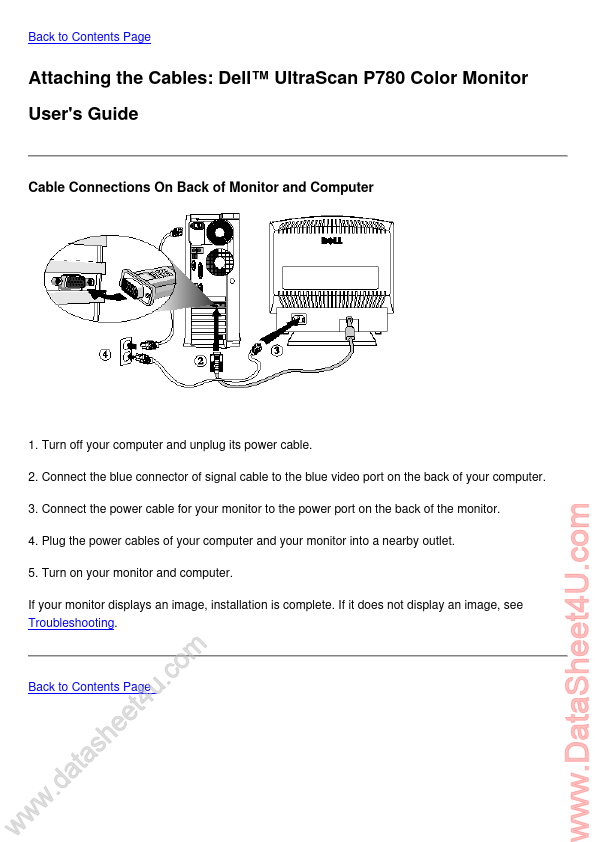
Back to Contents Page Attaching the Cables: Dell™ UltraScan P780 Color Monitor User's Guide Cable Connections On Back of Monitor and Computer 1. Turn off your computer and unplug its power cable. 2. Connect the blue connector of signal cable to the blue video port on the back of your computer. 3. Connect the power cable for your monitor to the power port on the back of the monitor. 4. Plug the power cables of your computer and your monitor into a nearby outlet. 5. Turn on your monitor and computer. If your monitor displays an image, installation is complete. If it does not display an image, see Troubleshooting. Back to Contents Page w w w .d e e h s a t a . u t4 m o c www.DataSheet4U.
Published: |