RF224
RF224 is A10 208 VAC / 20A / Feed-Thru Relay Fixture Receiver manufactured by Unknown Manufacturer.
A10 208 VAC, 20A, Feed-thru Relay Fixture Receiver
BEFORE YOU BEGIN...
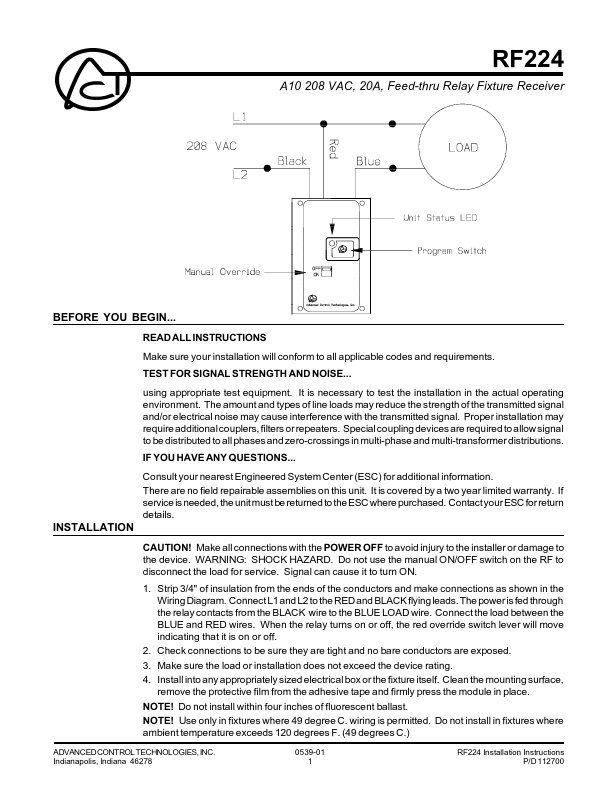
READ ALL INSTRUCTIONS Make sure your installation will conform to all applicable codes and requirements. TEST FOR SIGNAL STRENGTH AND NOISE... using appropriate test equipment. It is necessary to test the installation in the actual operating environment. The amount and types of line loads may reduce the strength of the transmitted signal and/or electrical noise may cause interference with the transmitted signal. Proper installation may require additional couplers, filters or repeaters. Special coupling devices are required to allow signal to be distributed to all phases and zero-crossings in multi-phase and multi-transformer distributions. IF YOU HAVE ANY QUESTIONS... Consult your nearest Engineered System Center (ESC) for additional information. There are no field repairable assemblies on this unit. It is covered by a two year limited warranty. If service is needed, the unit must be returned to the ESC where purchased. Contact your ESC for return details. CAUTION! Make all connections with the POWER OFF to avoid injury to the installer or damage to the device. WARNING: SHOCK HAZARD. Do not use the manual ON/OFF switch on the RF to disconnect the load for service. Signal can cause it to turn ON. 1. Strip 3/4" of insulation from the ends of the conductors and make connections as shown in the Wiring Diagram. Connect L1 and L2 to the RED and BLACK flying leads. The power is fed through the relay contacts from the BLACK wire to the BLUE LOAD wire. Connect the load between the BLUE and RED wires. When the relay turns on or off, the red override switch lever will move indicating that it is on or off. 2. Check connections to be sure they are tight and no bare conductors are exposed. 3. Make sure the load or installation does not exceed the device rating. 4. Install into any appropriately sized electrical box or the fixture itself. Clean the mounting surface, remove the protective film from the...