Datasheet4U Logo Datasheet4U.com

QD141X1LH03 - Laptop LCD Removal Instructions

📥 Download Datasheet

Datasheet preview – QD141X1LH03

Datasheet Details

Part number QD141X1LH03
Manufacturer L4L
File Size 2.61 MB
Description Laptop LCD Removal Instructions
Datasheet download datasheet QD141X1LH03 Datasheet
Additional preview pages of the QD141X1LH03 datasheet.
Other Datasheets by L4L

Full PDF Text Transcription

Click to expand full text
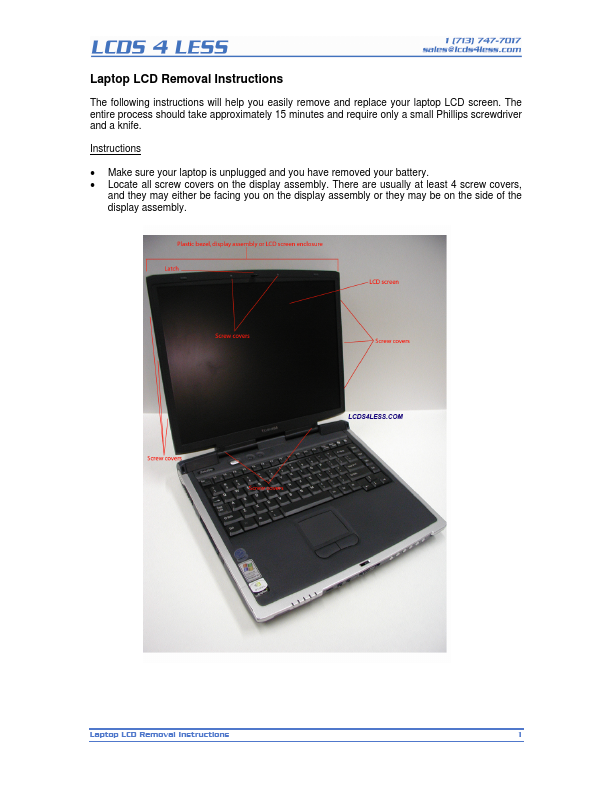
Laptop LCD Removal Instructions The following instructions will help you easily remove and replace your laptop LCD screen. The entire process should take approximately 15 minutes and require only a small Phillips screwdriver and a knife. Instructions • • Make sure your laptop is unplugged and you have removed your battery. Locate all screw covers on the display assembly. There are usually at least 4 screw covers, and they may either be facing you on the display assembly or they may be on the side of the display assembly. Laptop LCD Removal Instructions 1 • The following Toshiba Satellite model has 2 screw covers at the bottom of the display assembly facing the user and 3 screw covers on each side of the display assembly.
Published: |