

Datasheet4U Logo Datasheet4U.com

KX-DT346 - Digital Proprietary Telephone Quick Reference Guide

Download the KX-DT346 datasheet PDF. This datasheet also covers the KX-DT333 variant, as both devices belong to the same digital proprietary telephone quick reference guide family and are provided as variant models within a single manufacturer datasheet.

General Description

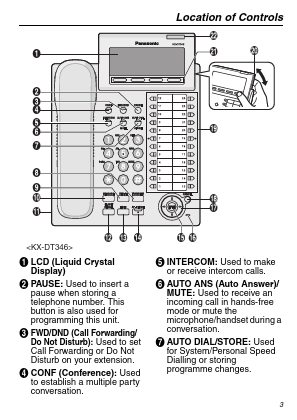
can be found in "Location of Controls" on page 3.

Key Features

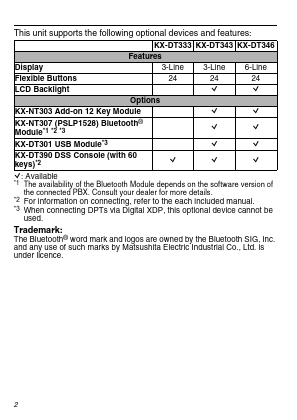
  • KX-DT333 KX-DT343 KX-DT346 Features Display 3-Line 3-Line 6-Line Flexible Buttons 24 24 24 LCD Backlight Q Q Options KX-NT303 Add-on 12 Key Module Q Q KX-NT307 (PSLP1528) Bluetooth® Module.
  • 1.
  • 2.
  • 3 KX-DT301 USB Module.
  • 3 KX-DT390 DSS Console (with 60 keys).
  • 2 Q: Available.
  • 1 Q Q Q Q Q Q Q The availability of the Bluetooth Module depends on the software version of the connected PBX. Consult your dealer for more details.
  • 2.
  • 3 For information on connecting, refer.

📥 Download Datasheet

Note: The manufacturer provides a single datasheet file (KX-DT333-Panasonic.pdf) that lists specifications for multiple related part numbers.

Datasheet Details

Part number KX-DT346
Manufacturer Panasonic
File Size 728.91 KB
Description Digital Proprietary Telephone Quick Reference Guide
Datasheet download datasheet KX-DT346 Datasheet

Full PDF Text Transcription (Reference)

The following content is an automatically extracted verbatim text from the original manufacturer datasheet and is provided for reference purposes only.

View original datasheet text
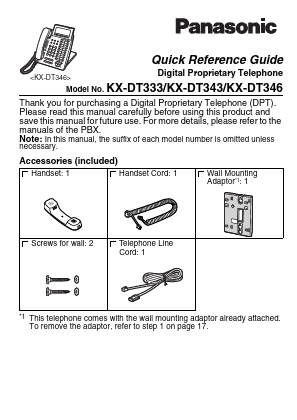
Quick Reference Guide Digital Proprietary Telephone Model No. KX-DT333/KX-DT343/KX-DT346 necessary. Thank you for purchasing a Digital Proprietary Telephone (DPT). Please read this manual carefully before using this product and save this manual for future use. For more details, please refer to the manuals of the PBX. Note: In this manual, the suffix of each model number is omitted unless Accessories (included) Handset: 1 Handset Cord: 1 Wall Mounting Adaptor*1: 1 Screws for wall: 2 Telephone Line Cord: 1 *1 This telephone comes with the wall mounting adaptor already attached. To remove the adaptor, refer to step 1 on page 17.