Datasheet4U Logo Datasheet4U.com

CDR795 - (CDR795 / CDR796) Audio CD Player

Datasheet Summary

Features

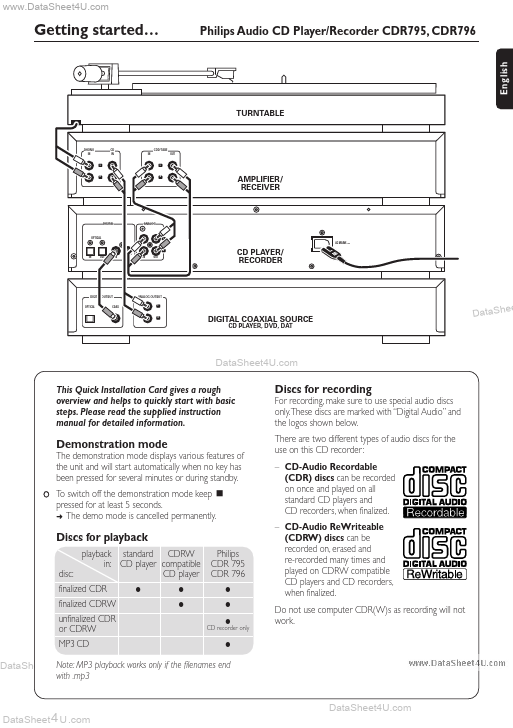
  • of the unit and will start automatically when no key has been pressed for several minutes or during standby. 0 To switch off the demonstration mode keep Ç pressed for at least 5 seconds. ➜ The demo mode is cancelled permanently. Discs for playback playback standard CDRW in: CD player compatible disc: CD player finalized CDR finalized CDRW unfinalized CDR or CDRW MP3 CD G G G Philips CDR 795 CDR 796 G G G CD recorder only G Note: MP3 playback works only if the filenames end DataSheet4U. com wi.

📥 Download Datasheet

Datasheet preview – CDR795

Datasheet Details

Part number CDR795
Manufacturer Philips
File Size 663.43 KB
Description (CDR795 / CDR796) Audio CD Player
Datasheet download datasheet CDR795 Datasheet
Additional preview pages of the CDR795 datasheet.
Other Datasheets by Philips

Full PDF Text Transcription

Click to expand full text
www.DataSheet4U.com Getting started… Philips Audio CD Player/Recorder CDR795, CDR796 English TURNTABLE PHONO IN CD IN CDR/TAPE IN OUT L L R R AMPLIFIER/ RECEIVER DIGITAL ANALOG OPTICAL L AC MAINS R ~ IN OUT IN OUT IN OUT CD PLAYER/ RECORDER DIGITAL OUTPUT ANALOG OUTPUT L OPTICAL COAX R DIGITAL COAXIAL SOURCE CD PLAYER, DVD, DAT ee DataSh DataSheet4U.com This Quick Installation Card gives a rough overview and helps to quickly start with basic steps. Please read the supplied instruction manual for detailed information. Discs for recording For recording, make sure to use special audio discs only.These discs are marked with “Digital Audio” and the logos shown below.
Published: |