Philips HTS3365
Quick Start Guide
| Part No. | HTS3365 |
|---|---|
| Datasheet | HTS3365 Download |
| Manufacturer |  Philips Philips |
| Description | Quick Start Guide |
| Buy | Stock & Price |
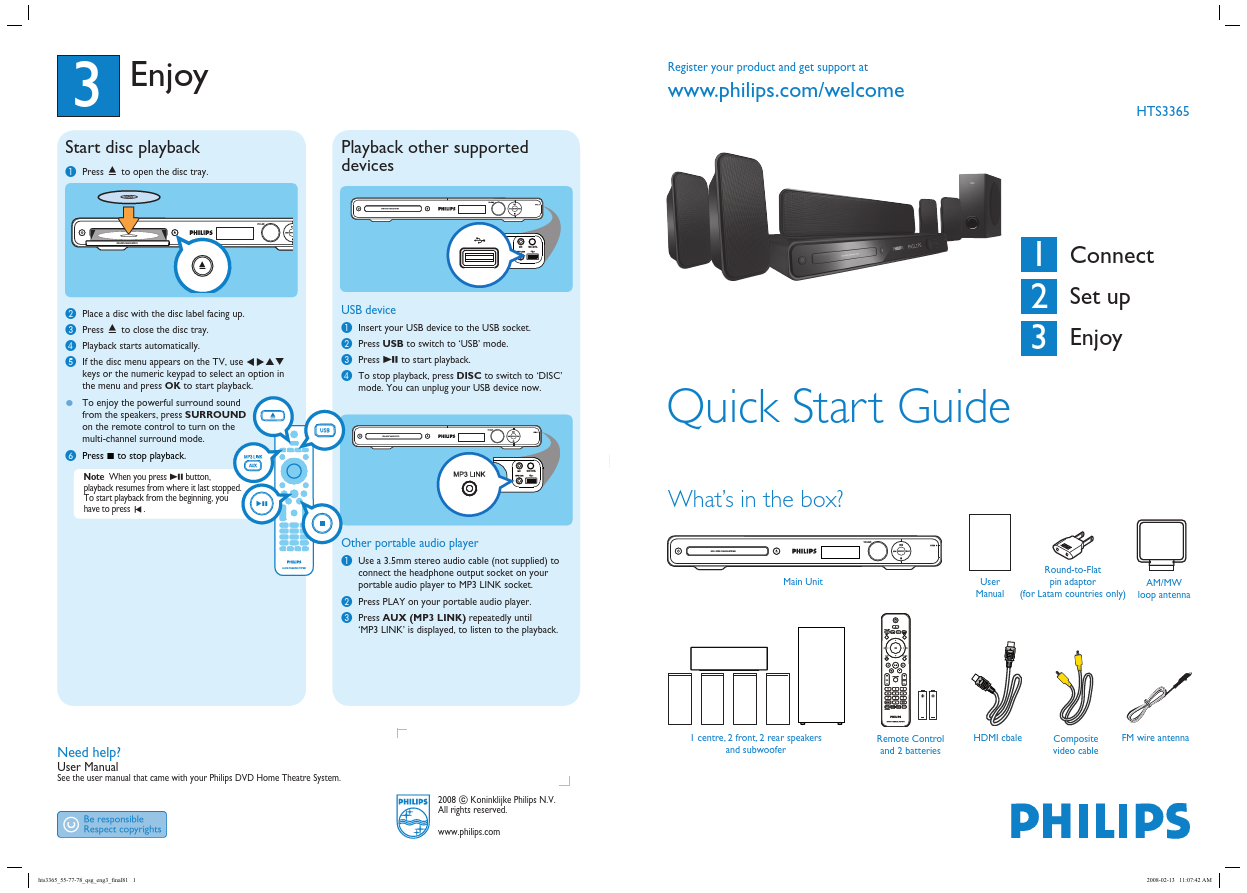
3 Enjoy Playback other supported devices Register your product and get support at HTS3365 Start disc playback A Press ç to open the disc tray. MIC MP3 LINK MIC LEVEL B C D E Place a disc with the disc label facing up. Press ç to close the disc tray. Playback starts automatically. If the disc menu appears on the TV, use keys or the numeric keypad to select an option in the menu and press OK to start playback. from the speakers, press SURROUND on the remote control to turn on the multi-channel surround mode. USB device A B C D Insert your USB device to the USB socket. Press USB to switch to ‘USB’ mode. Press u to start playback. To stop playback, press DISC to switch to ‘DISC’ mode. You can unplug your USB device now. 1 2 3 Connect Set up Enjoy z To enjoy the powerful surround sound Quick Start Guide F Press to stop playback. MIC MIC LEVEL Note When you press u button, playback resumes from where it last stopped. To start playback from the beginning, you have to press . MP3 LINK What’s in the box?