TelcoBridges TMS1600
Quick Installation Guide
| Part No. | TMS1600 |
|---|---|
| Datasheet | TMS1600 Download |
| Manufacturer | TelcoBridges |
| Description | Quick Installation Guide |
| Buy | Stock & Price |
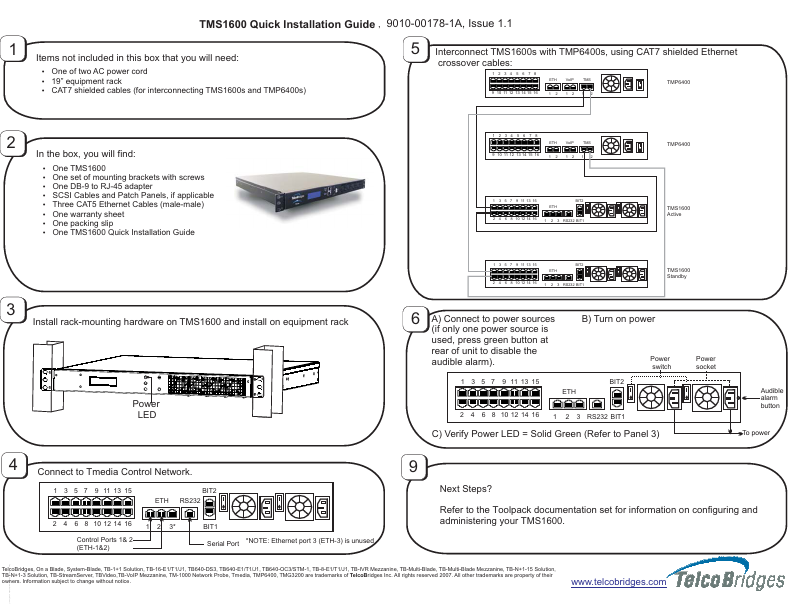
TMS1600 Quick Installation Guide , 9010-00178-1A, Issue 1.1 1 Items not included in this box that you will need: ? One of two AC power cord ? 19” equipment rack ? CAT7 shielded cables (for interconnecting TMS1600s and TMP6400s) 5 Interconnect TMS1600s with TMP6400s, using CAT7 shielded Ethernet crossover cables: 1 2 3 4 5 6 7 8 ETH VoIP TMS TMP6400 9 10 11 12 13 14 15 16 1 2 1 2 1 2 2 1 2 3 4 5 6 7 8 ETH VoIP TMS TMP6400 In the box, you will find: ? ? ? ? ? ? ? ? 9 10 11 12 13 14 15 16 1 2 1 2 1 2 One TMS1600 One set of mounting brackets with screws One DB-9 to RJ-45 adapter SCSI Cables and Patch Panels, if applicable Three CAT5 Ethernet Cables (male-male) One warranty sheet One packing slip One TMS1600 Quick Installation Guide 1 3 5 7 9 11 13 15 ETH BIT2 TMS1600 Active 3 RS232 BIT1 2 4 6 8 10 12 14 16 1 2 1 3 5 7 9 11 13 15 ETH BIT2 TMS1600 Standby 3 RS232 BIT1 2 4 6 8 10 12 14 16 1 2 3 Install rack-mounting hardware on TMS1600 and install on equipment rack 6 A) Connect to power sources (if only one power source is used, press green button at rear of unit to disable the audible alarm).