CY2081
CY2081 is Three-PLL General-Purpose EPROM-Programmable Clock Generator manufactured by Cypress.
..
Three-PLL General-Purpose EPROM-Programmable Clock Generator
Features
- Factory-EPROM configurable for quick availability and prototyping
- General purpose clock synthesizer for all applications
- such as modems, disk drives, CD-ROM drives, Video CD players, games, set-top boxes, data/telemunications, etc.
- Three independent configurable clock outputs
- Outputs ranging from 500 k Hz to 100 MHz (5V) and up to 80 MHz for 3.3V operation
- Configurable output control pin (pin 8) can be used as an output enable, power-down, suspend or select line.
- Phase-locked loop oscillator input derived from external crystal (10 MHz to 25 MHz) or external reference clock (1 MHz to 30 MHz)
- 3.3V or 5V operation (factory configured)
- 8-pin 150-mil packaging achieves minimum footprint for space-critical applications
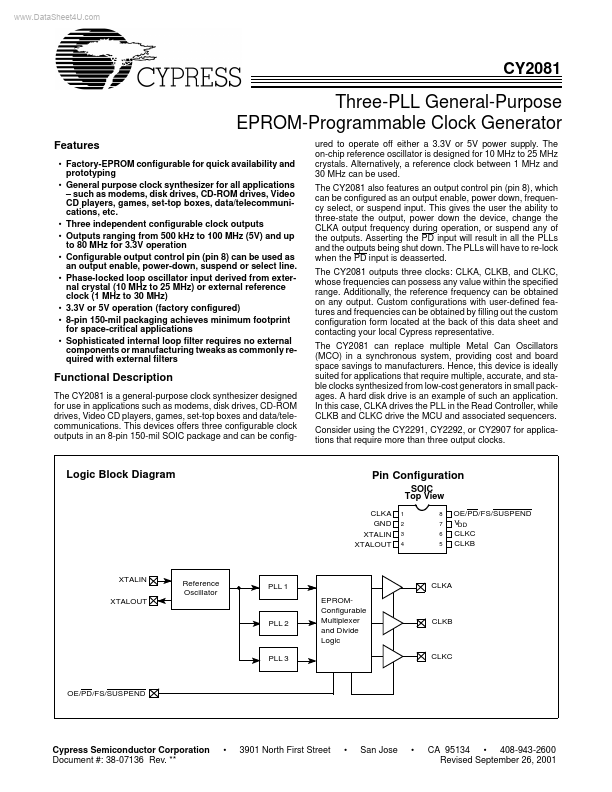
- Sophisticated internal loop filter requires no external ponents or manufacturing tweaks as monly required with external filters ured to operate off either a 3.3V or 5V power supply. The on-chip reference oscillator is designed for 10 MHz to 25 MHz crystals. Alternatively, a reference clock between 1 MHz and 30 MHz can be used. The CY2081 also Features an output control pin (pin 8), which can be configured as an output enable, power down, frequency select, or suspend input. This gives the user the ability to three-state the output, power down the device, change the CLKA output frequency during operation, or suspend any of the outputs. Asserting the PD input will result in all the PLLs and the outputs being shut down. The PLLs will have to re-lock when the PD input is deasserted. The CY2081 outputs three clocks: CLKA, CLKB, and CLKC, whose frequencies can possess any value within the specified range. Additionally, the reference frequency can be obtained on any output. Custom configurations with user-defined Features and frequencies can be obtained by filling out the custom configuration form located at the back of this data sheet...