

WD1003-RA2 Datasheet Text
USER'S GUIDE
WD 1003-RAH WD 1003S-RAH WD 1003-RA2 WD 1003A-RA2 Winchester Disk Controllers
Important Information Do not Discard
Document Scope
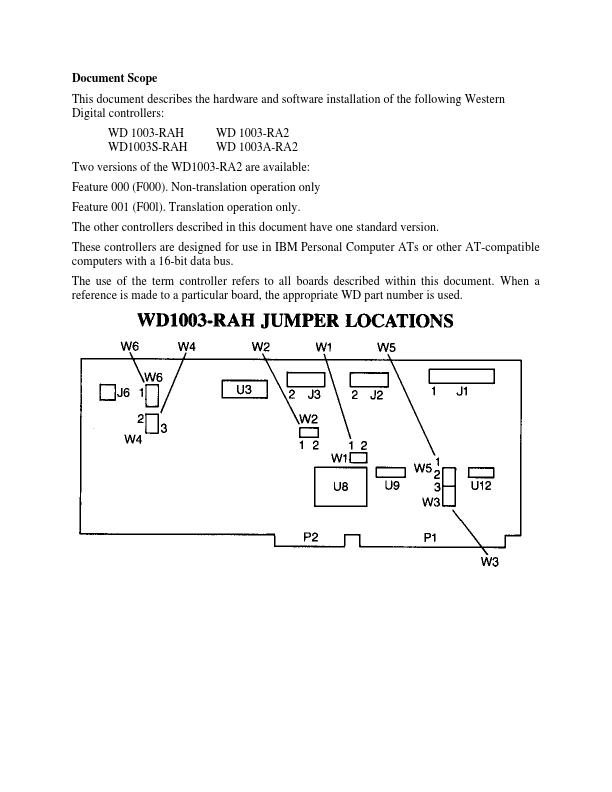
This document describes the hardware and software installation of the following Western Digital controllers:
WD 1003-RAH WD1003S-RAH
WD 1003-RA2 WD 1003A-RA2
Two versions of the WD1003-RA2 are available:
Feature 000 (F000). Non-translation operation only
Feature 001 (F00l). Translation operation only.
The other controllers described in this document have one standard version.
These controllers are designed for use in IBM Personal puter ATs or other AT-patible puters with a 16-bit data bus.
The use of the term controller refers to all boards described within this document. When a reference is made to a particular board, the appropriate WD part number is used.
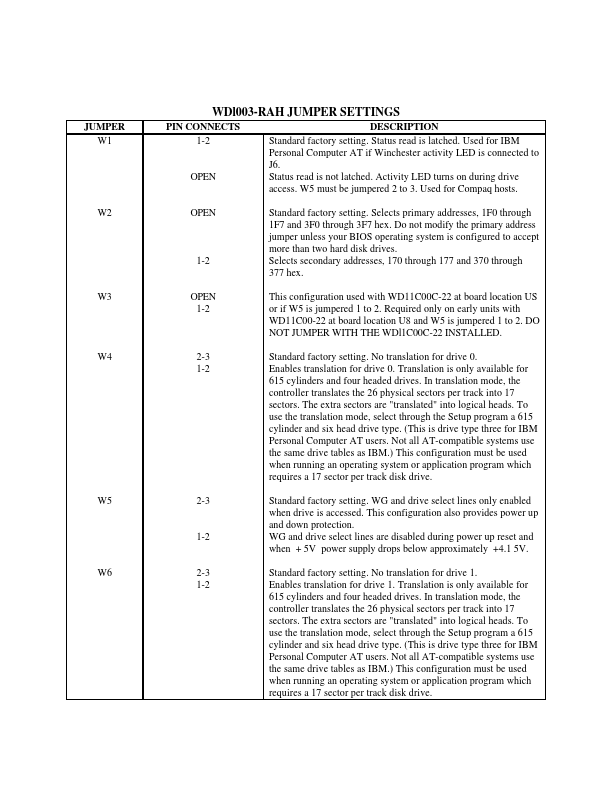
JUMPER W1 W2 W3 W4
W5 W6
WDl003-RAH JUMPER SETTINGS
PIN CONNECTS
DESCRIPTION
1-2 OPEN
Standard factory setting. Status read is latched. Used for IBM Personal puter AT if Winchester activity LED is connected to J6. Status read is not latched. Activity LED turns on during drive access. W5 must be jumpered 2 to 3. Used for paq hosts.
OPEN 1-2
Standard factory setting. Selects primary addresses, 1F0 through 1F7 and 3F0 through 3F7 hex. Do not modify the primary address jumper unless your BIOS operating system is configured to accept more than two hard disk drives. Selects secondary addresses, 170 through 177 and 370 through 377 hex.
OPEN 1-2
This configuration used with WD11C00C-22 at board location US or if W5 is jumpered 1 to 2. Required only on early units with WD11C00-22 at board location U8 and W5 is jumpered 1 to 2. DO NOT JUMPER WITH THE WDl1C00C-22 INSTALLED.
2-3 Standard factory setting. No translation for drive 0. 1-2 Enables...